

For most tech leaders today, custom software isn’t about cost savings or speed. It’s about differentiation.
And that makes sense—because off-the-shelf tools are built for the average use case. But your business? It’s anything but average.
In 2025, 95% of digital workloads are expected to run on cloud-native platforms, up 30% from 2021 1. Meanwhile, AI-native companies are scaling faster, with 47% reaching market fit compared to just 13% of those retrofitting AI into existing products 2. This shift reflects a broader truth: your software isn’t just a product anymore—it’s your strategy, operations, data advantage, and competitive moat.
User expectations are evolving too. In 2025, they demand zero-click experiences, AI-powered personalization, and multi-modal interfaces that work seamlessly across devices. Your software must keep pace—not just with competitors, but with the best tools in the market.
If you’re building for speed, scale, and defensibility, templates and pre-built tools will only get you so far. You need flexibility. You need control. You need software that fits your roadmap—not someone else’s release cycle.
That’s the promise of custom software.
But how do you know if you’re truly ready to go custom?
Start with this 5-point decision framework.
Should you even build custom? A 5-point decision framework
| Question | If Yes… | If No… |
| Do your workflows break standard tools? | Custom software is likely more efficient and sustainable. | Off-the-shelf might still suffice with configuration. |
| Are you trying to create a differentiated UX or business model? | Go custom-it’s your only path to uniqueness. | Templates may work if differentiation isn’t critical. |
| Is product velocity a competitive advantage? | Build custom to control roadmap and speed. | SaaS tools can support slower-moving ops. |
| Do you need deep AI or data integration? | Custom will allow secure, optimized, on-brand experiences. | Vendor lock-in might limit you. |
| Are you investing in long-term operational scale? | Custom software pays off in lower TCO and higher ROI. | Avoid it if you are not ready to own the asset. |
If you answered yes to many of these – custom software may not just be a good idea but a great competitive advantage your business can use to dominate your marketplace. But building custom software is not just about writing code. It is a strategic investment.
And to get it right, you need to align on the business, technical, and functional considerations, before you start custom software development.
In addition to these important considerations, in this article we’ll also discuss the important stages of the custom software development process, explore various development options (in-house or outsourced), discuss the importance of choosing the right development partner and provide guidance on how to keep development costs under control.
Essential considerations for custom software development
Business considerations
When you are developing custom software, it’s easy to dive right into features and stacks. But that’s not where value is built. If you’re a Founder, CTO, or Product Leader, you already know:
Tech is a means. Business outcomes are the end game.
These business considerations are what distinguish successful bespoke builds from sunk costs.
Build for competitive advantage- not just capability
In crowded markets, building what everyone else can replicate is a race to irrelevance. Custom software must provide you with a strategic advantage- something your competition cannot purchase off the shelf.
How to achieve it
- Start with user truth. Invest in serious market and user research. Don’t assume. Validate. What your users really struggling with that no one’s solving well? Conduct interviews, surveys, observations to find pain points and unique workflow.
- Pin down your USP. What’s the one thing your product will do better or differently- that actually matters to your market? Is it a unique feature? A fundamentally more efficient process? A novel integration? Bake that into the product from day one.
- Build to iterate. The edge you build today won’t last forever. Prioritize flexibility and a roadmap that iterates based on market input and tech changes (particularly AI).
Use AI to accelerate innovation, not just automate tasks
Speed isn’t just nice to have- it’s existential. AI-driven custom software can shrink development cycles, unlock smarter workflows, and power 10X customer experiences.
How to achieve it
- Integrate AI where it drives value. Not every app needs a chatbot. Identify bottlenecks in your PDLC or product features where AI can deliver measurable acceleration or intelligence. For example, enhancing testing, automating code generation, providing predictive analytics, or personalizing user experiences.
- Treat data as a product. AI thrives on data. Before you build, make sure you have pipelines for clean, labeled, well-governed accessible data.
- Move fast but test smart. Use agile methodologies, but with a product-led mindset. Validate AI use cases early. Measure what moves the needle- not just what’s cool.
ROI-driven development
Custom software is an investment, not an expense. Without solid knowledge of its return on investment and total cost of ownership, you can’t justify the expenditure or make informed future decisions. Most companies only look at initial development costs and overlook long-term operations expenses and the value of potential revenue generation or cost savings.
How to achieve it
- Define KPIs before development. Establish SMART key performance indicators. These could include revenue growth, cost savings, user adoption, and customer satisfaction metrics.
- Calculate TCO. Look beyond the initial development. Factor in hosting, maintenance, support, security updates, feature enhancements, training, and potential opportunity costs of not building the software. Use cloud-native solutions where possible to optimize ongoing operational expenses.
- Review ROI regularly. Set quarterly checkpoints to assess if your software is still pulling its weight- and where to optimize next.
Technical considerations
If the business case gives you the why, the technical foundation gives you the how. And if you get it wrong, everything else cracks under pressure — scalability, security, speed, innovation.
This isn’t about chasing the flashiest tech — it’s about building a resilient, flexible, and intelligent core that scales with you, keeps your team agile, and actually supports your business trajectory.
Here are five technical areas you must get right:
Choose a tech stack that buys you leverage, not just launch velocity
Your tech stack isn’t just tooling — it’s a long-term strategic bet. The wrong call today becomes tomorrow’s tech debt, hiring problem, or re-architecture nightmare.
What to do
Don’t chase trends — evaluate ruthlessly. Stack decisions should align with:
- Scalability. Can it handle a 10x spike? ( eg, microservices, serverless capabilities)
- Performance. Does it meet your speed and efficiency requirements for critical operations?
- Security. Are there robust frameworks, established best practices, and strong community support for security?
- Cost. Don’t just think licenses — think hosting, maintenance, and talent availability.
- Talent Pool. Pick tech with strong community support and hiring pipelines. Tech is only as powerful as the people building with it.
Note: Use modular, microservices-friendly stacks. Prioritize cloud-native, cloud-agnostic frameworks so you’re not locked into one vendor or paradigm.
Bake AI and emerging tech into the core, not as afterthoughts
AI is no longer optional — it’s your innovation multiplier. But to use it effectively, your architecture needs to support fast, secure, and scalable AI integration from day one.
What to do
Build a real AI foundation:
- Robust data infrastructure (ETL, clean pipelines, lakes/warehouses)
- ML frameworks (like PyTorch, TensorFlow)
- AI development tools to improve processes, such as MLOps platforms, Jupyter Notebooks, and low-code/no-code AI tools.
- Cloud-based GPU instances and containerization (Docker, Kubernetes) for effective model serving comprise the deployment infrastructure.
Go beyond model building. Embed MLOps, ethical guardrails, and version control. Govern AI like any other critical system — especially as regulations tighten. Even Abhishek Gupta, our Principal Data Scientist & Head of Data Science cautions, “A lack of an ML production mindset from the beginning of a project can lead to surprises later on, especially during production time, resulting in re-modeling and delayed time-to-market.” Check the article to know more: An MLOps Mindset: Always Production-Ready
Think RAG over retraining. Want LLMs that understand your business? Retrieval-Augmented Generation (RAG) lets you ground models in your own data without costly retraining. It’s more accurate, private, and cost-effective.
Use AI to shift left. Automate testing, QA, and risk detection earlier in the dev lifecycle. You’ll catch more issues, ship faster, and free up human bandwidth for higher-order work.
Also Read: How to Implement RAG Pipeline Using Spring AI
Design for scalability, extensibility and maintainability
Your business will evolve. Your software needs to keep up. If your architecture can’t flex with new features, markets, or scale, it will drag you down instead of lifting you up. Neglecting these aspects leads to costly refactoring, slow feature development, and a system that becomes a burden rather than an asset.
What to do
- Break it down. Favor modular, microservices-based systems that are loosely coupled. It makes parallel dev, scaling, and updates faster and safer. Each service can be developed, deployed and scaled independently.
- Think API-first. Design everything with interoperability in mind. This makes future integrations, partnerships, or feature additions far easier.
- Build in the cloud, smartly. Platforms like AWS, GCP, and Azure offer flexibility, failover, elasticity, and cost control — all critical as you scale. Go cloud-native, not just cloud-hosted.
- Invest in observability early. Use AI-driven monitoring to track usage, performance, and anomalies in real time. This prevents issues before users ever see them and keeps ops costs predictable.
Also Read: How to Migrate an Observability Platform to Open Source
Integrate or die
Systems don’t live in a vacuum. If your custom software doesn’t sync with your CRM, ERP, or marketing stack, you’ll end up with data silos, frustrated teams, and shadow workflows.
What to do?
- Audit your ecosystem. Know what tools matter most — and where integration will drive the most value.
- Define high-priority flows. What data must move between systems, and how often?
Pick the right strategy:
- Native integrations. Great if available — fast and simple.
- iPaaS platforms. Tools like Boomi or Celigo can simplify complex flows with low-code flexibility.
- Custom APIs. For critical, high-control integrations, nothing beats building it your way.
Treat security like a product feature
One breach, and it’s game over. Data trust is business trust. Especially in AI-driven systems, privacy and compliance aren’t optional — they’re a moat.
What to do
Security by design. Don’t patch later. Architect for GDPR, SOC 2, HIPAA, or whatever applies — from day one.
Use layered protection:
- End-to-end encryption (in transit & at rest)
- Role-based access controls and strong auth
- Regular pen testing and vulnerability scans
Automate the basics. Set up pipelines for security checks in your CI/CD. Train your dev team in secure coding. Keep dependencies up to date — automatically if you can.
Create a culture of ownership. Everyone on the dev team should think like a security engineer. Make it part of your engineering DNA.
Functional considerations
You can have the sharpest business model and the most elegant tech stack, but if your product doesn’t work for your users—really work—it’s a total failure. This is where functional considerations come into play and your execution either compounds your strategic bets—or kills them.
Neglecting functional aspects means building software that looks great on paper but falls apart in the hands of real users. It means frustration, churn, wasted capital, and missed opportunity.
Let’s break down what you absolutely need to get right to deliver something users adopt, trust, and keep coming back to.
Build MVP to validate
Your goal isn’t to launch a masterpiece—it’s to prove your product works. A minimum viable product is your speedboat in a sea of slow-moving ships. It lets you test, iterate, and find fit without draining your runway.
How to achieve it
- Viable > Fancy. Define the must-haves that solve a core user problem. That’s your MVP. Everything else is noise.
- Think in sprints. Use agile. Short cycles, fast feedback, continuous iteration. Build, measure, learn—repeat.
- Feedback is gold. Bake user input into every phase—from ideation to post-launch. This is how you evolve from assumptions to insight, from feature overload to focused impact.
Building your own MVP becomes even easier when you know the right steps. To have a look over what each step involves you can access ours 8-step minimum viable product checklist developing a successful startup product.
Design UX/UI that drives real behavior
Bad UX kills products. If it’s clunky, confusing, or inefficient, users will bounce. Fast. On the other hand, great design builds trust, reduces support overhead, and drives adoption like nothing else.
How to achieve it
- Design for flow, not flash. Focus on intuitive navigation, design consistency, task efficiency, and actionable data visuals.
- Know your users. Do your homework—user research, pain point analysis, workflow mapping. Without this, you’re designing blind.
- One size doesn’t fit all. If your software touches sales, HR, finance, and ops—customize for each. Personalized dashboards and interfaces aren’t luxuries; they’re adoption levers.
Also Read: 5 Rules for better UX Design
Bake in QA and testing early
Bugs and performance issues don’t just slow you down—they damage your credibility. And fixing them after launch? 10x more painful and expensive.
How to achieve it
- Shift left. QA starts early—at the requirements and design stage. Bake quality into the build process.
- Review like you mean it. Code reviews, peer validation, and risk-based testing reduce defects and keep your quality bar high—even under pressure.
- Automate aggressively. Use test automation tools and CI/CD pipelines. Faster releases, fewer surprises, better sleep at night.
Plan for (and actively manage) functional risk
Every custom software project carries risk. The difference between winners and everyone else? The winners don’t hope things go right—they plan for when they won’t.
How to achieve it
- Know the traps. Scope creep, incomplete requirements, miscommunication, unrealistic estimates, wrong tech stack; if you don’t spot these early, they’ll wreck you later.
- Be proactive. Document obsessively, review code often, train your teams, and assign a dedicated PM or Scrum Master. These aren’t overhead—they’re insurance.
- Move fast when things break. Clear escalation paths. Transparent communication. Root-cause analysis. Problems are inevitable—how you respond is what counts.
Key steps in custom software development
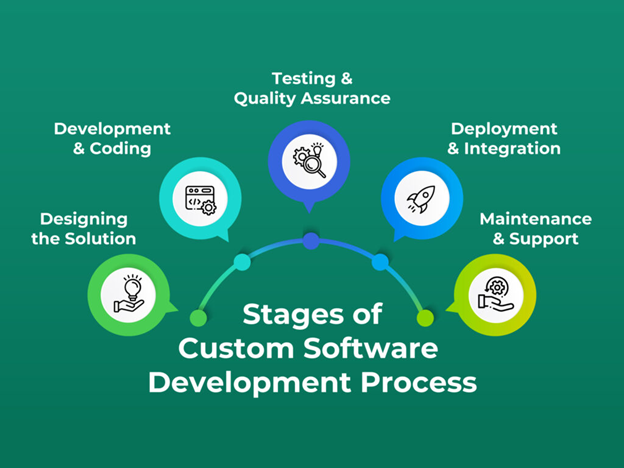
Once the groundwork for planning, feasibility checks, and goal alignments is done, it is time to execute.
Designing the solution
The design phase is critical for turning business objectives and technical specifications into a solid structure for the software. It is necessary to provide a clear detailed blueprint to understand how the system will work, both technically and from the user’s standpoint.
System architecture design
The architecture design defines how different software components, such as databases, servers, and applications, will interact with one another. It entails making critical decisions such as deciding between on-cloud and on-premise solutions, microservices, and monolithic architecture.
Engineers must ensure that their technologies, programming languages, frameworks, and tools are in line with the product’s vision, since this stage lays the groundwork for performance, security, and scalability. A mismatch might cause tech debt and the loss of important resources.
Database design
The database schema is established, such as how data is stored, retrieved, and controlled. Data models are developed to detail the relationships between disparate data entities. This step helps ensure that the system is able to process large amounts of data and that it is in compliance with any special data management or compliance standards.
UX & UI design
Engineers must groom the user story first before starting with the UX design as on it depends how intuitive and easy to use the software will be. User workflows are mapped out to ensure the software supports how users will interact with it and users can achieve their goals with minimal friction.
The UI design involves creating the visual elements of the software—such as screens, buttons, and menus—to align with the brand’s identity and create visually appealing designs. Stakeholders should get mockups, wireframes, or prototypes to understand what the final product will look like. It will reduce future iterations. The same can be used to gather early feedback from users before moving into development.
Also Read : 3 Ways UX Designs Can Draw Upon Architectural Concepts
Technical documentation
The team should document everything technical, including design documents, system flow diagrams, and interface specifications, to guide development. This roadmap ensures efficient software implementation and helps new recruits quickly understand the product, allowing them to get involved without delay.
This phase helps reduce risks by making early discoveries of potential issues and lays a solid ground for the development stage.
Development and coding
At this stage, the software is built according to the design specifications. Developers break the software into smaller modules, allowing parallel development for easier management. They write code in chosen languages and frameworks while following coding standards and best practices. Version control solutions, such as Git, facilitate collaboration and monitor code modifications, whereas continuous integration (CI) identifies issues early by performing automated tests with each code integration.
From our experience developing over 200 products, I can say that design handover to developers is critical here. Design specifications must be very explicit, or they may result in unnecessary iterations and deadline problems.
During this phase, backend and frontend development are frequently done concurrently. Backend developers are responsible for server-side logic, databases, and APIs, whereas frontend developers design the user experience and guarantee smooth interaction with the backend. Many teams employ an iterative or Agile strategy, delivering features in short cycles (sprints) that allow for constant feedback and modifications to better align the product with user and business goals.
Unit testing is carried out throughout development to ensure that individual components work as planned. This occurs effortlessly when team members use platforms such as Slack and Jira to communicate, track progress, and manage tasks efficiently.
Testing and quality assurance
Testing and quality assurance ensures that the product meets the necessary requirements and functions properly. The phase begins with unit testing, in which developers test individual software components or modules to ensure that they function properly in isolation.
Once these components are integrated, developers will conduct functional testing to ensure that the entire system runs smoothly and that all features interact appropriately. Test cases are rigorously developed based on design criteria, encompassing a wide range of situations, including edge cases, to ensure that the software operates as planned under numerous circumstances.
With GenAI now in the mix, this stage is undergoing a major transformation. Developers can rapidly generate diverse testing scenarios using AI, allowing them to test the software more thoroughly and efficiently, ultimately enhancing the product’s efficacy and reliability.
There are more testing methodologies than functional testing. Performance testing determines how effectively a system handles large workloads. Stress testing puts the system to its limits in harsh situations. Security testing seeks to identify weaknesses. User acceptability testing (UAT) assesses software from the end-user’s perspective to ensure that it fulfills their requirements and business objectives.
Bugs and other issues are reported directly to the development team for resolution. This cycle of testing, feedback, and fixes should continue until the program is stable, dependable, and ready for deployment.
Deployment and Integration
During this step, developers move the software from the development or testing environment to the live production environment. They place it on servers or platforms where people may access it. Automation has accelerated and improved the process while decreasing the likelihood of mistakes.
To fix any remaining challenges, the product should be rolled out gradually or piloted with a limited group of users.
Deployment is critical since many products fail before reaching this point. In the case of AI, the figure is about 85%.
Software integration has to be seamless with existing systems, tools, or databases. It should work well with the organization’s current infrastructure. The process may also require data migration. Developers should work on how data flows between systems as well to ensure no disruptions occur.
Our experience tells us that there should be another round of testing in the live environment after this to confirm the software is ready for full use.
Maintenance and support
The custom software development process doesn’t stop at deployment and integration. It requires further involvement for maintenance and support. Regular updates will be provided based on user requirements. Fixing bugs, improving performance, and ensuring compatibility with new technologies or changes in the business environment will also require careful planning.
Customizing is good, but over-customization can kill the product. Developers must assess if customer-specific features benefit the broader user base. Irrelevant features can turn into tech debt and create future problems. Striking the right balance ensures long-term product success.
If you are worried your team might be sitting on a tech debt time bomb? [Check out our guide on how to identify and manage tech debt before it derails your progress.]
Support, on the other hand, involves assisting users with any issues they encounter while using the software. This could range from troubleshooting technical problems to offering guidance on new features. A dedicated support team is usually available to resolve these issues quickly, minimizing disruptions. Continuous support helps ensure user satisfaction and smooth operation, while also gathering valuable feedback that can inform future updates or improvements to the software.
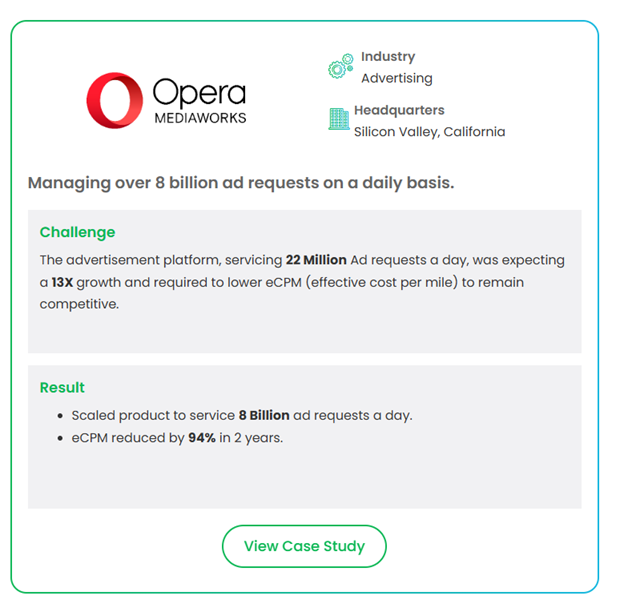
While developing a product to handle 8 billion daily ad requests for an adtech company, we recognized the importance of ROI. Some demands offer no clear short- or long-term impact. Product managers should sideline those requests and focus on what truly matters.
Understanding the cost of development
When building custom software, the question “How much will it cost?” is not a straightforward one—and if you approach it that way, you are already setting incorrect expectations. The cost is more than simply the number of hours invoiced; it is a result of decisions taken. Decisions about scope, talent, architecture, process, and time! Here are the six important cost levers you should be considering:
Scope and feature set
Every feature carries a cost. The larger and less specified your scope, the more time you’ll spend reworking and meeting expectations.
Team composition and location
A senior engineer in San Francisco may charge more. Someone with equivalent competence offshore? Less. But raw rates are deceptive. The real cost is reflected in cycle time, rework, and product quality. A high-output engineer who solves the appropriate problem once is more valuable than three who require management twice a day.
Tech stack decisions
Pick the wrong stack and you’ll pay for it — in hiring bottlenecks, maintainability issues, and integration headaches. Choose tech that aligns with your team’s capabilities, the problem’s constraints, and your future scale. Don’t chase hype unless it solves a real bottleneck.
Third-party integrations and dependencies
APIs, SDKs, and commercial platforms may appear to be shortcuts—until you pay $15K/year to babysit fragile connections or work with licensing oddities. Evaluate the whole cost of ownership, not simply the time spent prototyping.
Development methodology
Agile is more than just a buzzword; it is a cost-control strategy. Waterfall may appear predictable, but surprises pile up late and pricey. Agile provides tight feedback loops and controlled iteration, which equates to less rework and faster learning.
Time to market
Every week you delay launch is a week of lost learning, market share, and revenue. The real cost isn’t just development spend — it’s opportunity cost. Getting to users faster compounds value.
In-house vs. outsourced custom software development
There’s more than one way to build. You can staff up while keeping everything internal. Alternatively, you can outsource to the right custom software development partner to move quicker, leaner, and with access to top-tier talent.
Here’s how we break it down:
| Factor | What to consider | In –house development | Outsourced development |
| Team Expertise | Do you have the capability now? | Works when you already have developers familiar with your stack and domain. Developing new skill sets will take time. | You’ll get direct access to engineers who have already handled these challenges, including those with particular skills like as AI, compliance, or complicated data systems. |
| Project Scope and Focus | Is this core intellectual property or a fast-moving extension? | Go in-house when you’re building core infrastructure that defines your company. | Outsource when speed, flexibility, or team focus are required. Ideal for experimental builds, pilots, and heavy-lift integrations. |
| Culture & Collaboration | How closely should the team coincide with your mindset? | Seamless when your internal team already has the same pace and product passion. | This might vary based on the partner. The right partner seems like an extension of your team, not an outsourced resource. Check for alignment in working style, not simply credentials. |
| Budget Strategy | Are you thinking about long-term ownership or speed to outcome? | Higher upfront costs include hiring, onboarding, infrastructure, and lengthier development cycles. | More cost-effective for faster cycles. You eliminate the costs of starting a team from scratch, which is especially useful if speed to market is critical. |
| Control and Visibility | How much oversight do you require? | Maximum control. Prioritization, communication, and iteration are all managed directly by you. | A little less control, but the trade-off might be quickness and attention. Strong partners will provide visibility through agile cycles, not black-box development. |
| Security & IP | How sensitive is the information or technology? | If your workforce is knowledgeable on compliance and security measures, you will face fewer risks. | With the right partner, particularly one with experience in regulated sectors, security may be tight. Just don’t compromise on due diligence. |
The takeaway:
There is no one-size-fits-all solution.
If you’re constructing the engine that will fuel your long-term differentiation and have the time to expand talent, consider going in-house.
However, if speed, access to specific knowledge, or shorter time-to-market are critical, outsourcing to a professional custom software development partner can provide a significant advantage. Making the right choice requires careful assessment, and our guide can help.
[Download the Guide – The Guide To Onboard Right Product Development Partner]
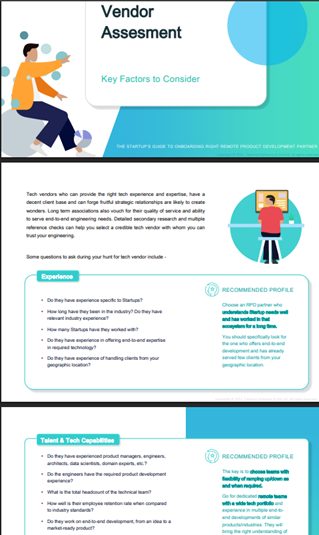
You can have the right idea, timing, and money, but if you get the development team wrong, the entire thing might fail before users even touch it.
Choosing a development partner is not procurement. It is strategic alignment.
Here’s what you should look for:
Technological experience that matches the challenge
Do not settle with generalists. You want a team that has gone through difficult times: scaling systems under stress, developing HIPAA-compliant apps, implementing real-time AI pipelines, and designing durable microservices.
They should know when to be boring — and when to be bold. Smart architectural choices early on mean less refactoring later.
Top talent, not just resources
This is not about throwing body at JIRA tickets. You need engineers who can provide clean code and bring product knowledge to the table. Builders who are concerned with results, question assumptions, and grasp user intent.
Great teams have strong opinions, which is a sign of strength.
A product mindset, not a project mindset
If your development staff is only focused on meeting deadlines and delivering results, you’re in danger.
Look for a partner who builds as if it were their own product. Who cares about what occurs after the launch? Retention, conversion, and feature usage. A team that values iteration and operates inside the feedback loop.
Innovation with purpose
You don’t need buzzword compliance. You need useful innovation — the kind that cuts cost, drives user value, or unlocks new capabilities.
That might mean designing for extensibility. Or bringing in AI where it actually creates leverage. But never novelty for novelty’s sake.
Conclusion
Custom software is one of the most lucrative investments you can make. When done well, it creates a competitive advantage—a moat, a multiplier. When done incorrectly, it creates a costly distraction.
So don’t only focus on building faster and cheaper. Concentrate on creating better solutions with the right people, for the right reasons, and at the right time.
In a loud digital market, the winners aren’t those who simply ship but the ones that ship the correct thing and learn quicker than the competition.
If you’re considering custom software development and want a partner who blends engineering expertise with a thorough grasp of your industry, a keen product instinct, and an affinity for innovation, let’s discuss.